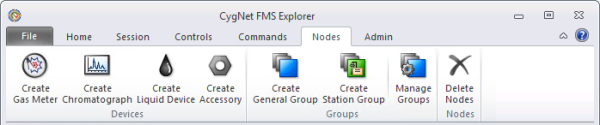
Use the Nodes menu to manually create, customize, and manage FMS device and group Nodes in your system.
A Node is the basic organizational element within CygNet Measurement, and each Node has its own set of properties. Nodes facilitate the organization of gas and liquid device data within FMS Explorer. Creating group Nodes is a way to further organize data in order to quickly access related Nodes for data analysis. See Nodes in the CygNet Measurement Concepts topic for more information about Nodes.
CygNet Measurement also provides mechanisms to automatically create certain FMS device or group Nodes in your system. See the following topics for more information about these options.
Note: There are several options for customizing access to FMS Explorer controls. See FMS Explorer User Interface for more information.
You must have proper security authorization to create and manage Nodes. See FMS Security (and NODE security event) for information about configuring security access.
When a Node is created, it becomes effective from the time you select to begin the record, going forward indefinitely. The newly created Node will be displayed in Node choosers throughout FMS Explorer, unless you select (on the Home menu) to view your system from a specific point in time (PIT) for which the Node does not exist. Once created, the Node exists in the system unless you either delete the Node from a point in time or purge the Node records from the system. See Deleting Nodes and Purging Records for more information about these actions.
The FMS Explorer Nodes menu includes the following categories of Node actions.
Device configuration options include Create Gas Meter, Create Chromatograph, and Create Liquid Device. Use these buttons to define new FMS Gas Meter Nodes, Chromatograph Nodes, and Liquid Device Nodes.
Use the Create Accessory button to define new FMS Accessory Nodes. The FMS Accessory Node is available for use with CygNet Dispatch for job scheduling in conjunction with a CygNet Measurement system, but can be configured for additional not-metering uses in your system, as deemed appropriate.
Group configuration options include Create General Group and Create Station Group. Use these buttons to define new FMS group Nodes of distinct types and categories.
Use the Manage Groups button to access additional options to edit and manage your Node groups and group categories.
Use the Delete Nodes button to access options to either delete specified Nodes from a specific point in time in the records, or purge specified Nodes and their records from your system.
More:

|
|
|


